PureLink:Phone&Location Track
- 4.5
- Rating
- 500.00K
- Installs
- Free
- Price

 Analysis by App-foxy
PureLink: Phone&Location Track is a free tools app from easysoft that aims to make everyday sharing less awkward. I approached it less like a novelty utility and more like something I might use when coordinating with family, friends, or someone I am meeting across town. Its central appeal is simple: communication can become easier when the right contact information or location detail is shared at the right moment, rather than explained through several messages.
That simplicity is also where I think the app needs the most careful attention. Anything connected with phone details or location deserves a slower setup and a clear understanding of what I am choosing to share. PureLink can be useful when everyone involved understands the exchange, but I would not treat it as an app to install casually and leave running without checking its controls. Convenience is valuable here only when it remains under the user’s control.
What PureLink is trying to solve in daily communication
In ordinary messaging, I often end up sending a phone number in one conversation, an address in another, and a location explanation in a third. That works, but it creates clutter and leaves room for mistakes. PureLink is designed around the idea that sharing should be more direct. The store summary presents easy sharing as the route to simpler communication, and that matches the practical reason I would consider using it.
You May Also Like

 Blood Strike: 2.5 Anniversary
Blood Strike’s Loadouts Turn Every Drop Into a Tactical Gamble
A close look at Blood Strike’s custom loadouts: how fast access to signature weapons reshapes its battle royale rhythm, rewards preparation, and narrows the gap between fights.

 Pandora - Music & Podcasts
Pandora’s Music Is Easy to Start, but Harder to Recover
Pandora’s strength is its low-effort path from a seed to a station. Its weak spot is how much confidence it asks you to place in connection, setup, and quiet recovery.

 8 Ball Pool
 Is Built on Rivalries, Rematches, and Routine
A close look at the rivalries, rematches, shared routines, and unanswered safety questions that turn a quick pool match into a persistent mobile community.

 Samsung Music
’s Quiet Strength Is Playing What You Already Own
Its reach comes less from spectacle than from dependable access to a personal library. That simplicity is both the app’s strongest retention engine and its ceiling.

 AccuWeather: Weather Radar
AccuWeather Review: A Quick, Clear Forecast for Everyday Decisions
For everyday plans, the best forecast is the one you can understand quickly. AccuWeather makes rain timing, radar, and local conditions easy to act on, with a few trade-offs.

 Hill Climb Racing
Why Hill Climb Racing Still Turns Crashes Into One More Run
A tiny car, a bumpy hill and one more upgrade: Hill Climb Racing keeps resurfacing because its simple chaos makes every near-miss feel personal.
More From Our News Desk



A realistic example is meeting a friend at a busy venue. Instead of typing a long explanation about which entrance I am near, I could use a sharing-focused tool to make the exchange more immediate. Another example is helping a family member find the right contact or understand where someone is expected to be. These are small moments, but they are exactly where reducing back-and-forth messages can make a tool worthwhile.
I would not describe PureLink as a replacement for a full messaging platform. Traditional chat apps are usually better when I need a long conversation, photos, group discussion, or a visible history of what was said. PureLink makes more sense as a focused utility for a particular sharing task. That distinction matters because people who expect a complete communication suite may find its purpose narrower than the name suggests.
The app sits in the tools category, and that is a good fit. I found its value easier to judge by the speed and clarity of a specific action than by the number of entertainment-style features it offers. The developer is easysoft, and the current version is 1.2.9. It requires Android 8.0 or later, so anyone using an older phone should check compatibility before planning around it.
Why the public reception is useful, but not enough
PureLink has a 4.4 average from around five thousand ratings and has passed half a million installs. Those figures suggest that many people find the basic concept useful, but they do not answer the questions I care about most with a sharing tool: what exactly appears before I confirm an action, how easy it is to stop sharing, and whether the app gives me enough context at sensitive moments.
I therefore see the rating as a reason to investigate, not as a substitute for judgment. A high score can reflect convenience, while privacy expectations are personal. Someone who only shares occasionally may have a very different experience from someone who uses location-related functions frequently. My recommendation depends more on whether the app’s visible choices feel understandable during use than on its popularity alone.
Trust starts with permissions and visible choices
For an app involving phone or location sharing, I would begin with the Android permission prompts rather than tapping through them automatically. I want to know which access is requested, whether it is needed for the action I am trying to perform, and whether Android offers a choice such as allowing access only while the app is in use. If a permission appears unrelated to my immediate purpose, I would pause before accepting it.
This is not a criticism of PureLink specifically; it is the correct habit for any app handling sensitive information. Permission wording can change with the operating system, and the safest decision is the one I can make after reading the prompt on my own device. I would also revisit the app’s permissions later through Android settings, especially after an update, because an app’s behavior and the operating system’s controls can evolve.
The same caution applies to notifications. A notification can be helpful if it confirms an action, but message previews or location-related text may be visible on a locked screen. I would check whether notification content can be hidden while keeping essential alerts enabled. That small adjustment reduces the chance that a private detail appears in front of someone else.
Before sharing anything, I would look for a clear confirmation step. The most reassuring workflow is one where I can see what is about to be sent, who will receive it, and whether the action is temporary or ongoing. If the screen makes those details difficult to distinguish, I would use a more familiar alternative instead. For sensitive sharing, speed should never come from removing the final moment of review.
The moments when extra care matters
Location information is more revealing than a normal text message because it can show where I am now, where I have just been, or where I regularly spend time. Even when I trust the person receiving it, I would avoid sharing from a private location unless there is a clear reason. I would also think twice before sending a location while upset, rushed, or distracted, since those are the moments when an accidental audience or wrong destination is easiest to miss.
Phone details deserve similar care. A number can lead to unwanted calls, account recovery attempts, or contact from people I did not intend to reach. I would use PureLink only with recipients I already recognize and would avoid treating a convenient share action as permission to distribute someone else’s number. If I were helping another person, I would ask before passing along their information.
One practical habit I recommend is separating planning from sending. I would first decide exactly what the other person needs: a contact detail, a one-time meeting location, or a more general way to coordinate. Then I would open the app and perform only that action. This prevents the common mistake of exploring several sharing options while a sensitive permission or recipient selection is already active.
Another useful habit is checking the destination twice when a share is initiated from a busy screen. Names can look similar, and a familiar contact may have more than one number or account. I would not rely on a quick glance if the information is sensitive. A short pause before confirmation is a better trade-off than trying to undo an unintended disclosure later.
Where user agency makes or breaks the experience
I judge a sharing app by how easily I can say no, change my mind, or limit the scope of an action. PureLink is most appealing when it helps me complete one deliberate exchange without making me feel committed to continued access. I would look for controls that let me deny a permission, cancel a share, and return to normal phone settings without having to keep the app active.
Account controls are another important part of that decision. If the app asks me to create or connect an account, I would use the smallest amount of profile information needed for the intended function and review any sign-in choices carefully. I would also check whether there is a straightforward way to sign out or remove the account from the device. I do not want a temporary sharing task to become an unnecessary permanent identity trail.
Data practices deserve the same attention. I would read the app’s current privacy information and the disclosures shown during installation or inside the app, focusing on what information may be collected, why it is used, and whether it is shared with other parties. I would not assume that “free” means there is no data trade-off. The price is zero for the app, but informed use still requires understanding the choices presented on the device.
That point is especially important because PureLink includes in-app purchases ranging from around seven dollars to around thirty dollars per item. I would not regard those purchases as necessary for the basic decision to test the app, but I would still check the purchase screen before confirming anything. A tool that I use only occasionally should not receive payment details or purchases by accident, so I would keep purchase confirmation enabled through the app store.
Comparing it with familiar alternatives
For a one-off exchange with a trusted person, a normal messaging app may be the better choice. It is already installed, the recipient is visible in the conversation, and the context of the message can make the purpose clear. If I only need to send a phone number or a meeting point once, adding another utility may not save time.
A dedicated map application is usually stronger when navigation is the main goal. Maps tend to provide route planning, place search, and broader geographic context. PureLink is more interesting when the communication step itself is the problem, such as making a direct exchange without turning the conversation into a long explanation. I would choose the map tool for getting somewhere and PureLink for a focused sharing workflow, assuming its controls are clear at the moment I use it.
Built-in Android sharing tools also deserve consideration. They can be more predictable because they are part of the operating system and often expose familiar recipient and permission behavior. PureLink needs to justify its place on my phone by making the relevant sharing task noticeably clearer or quicker. If I cannot identify that advantage after a short trial, I would uninstall it rather than maintain two tools for the same occasional job.
For ongoing family coordination, a service designed specifically for group location or household communication may be more suitable, provided every participant understands its privacy settings. PureLink is not automatically the right answer simply because location is involved. Its best fit is a user who wants focused sharing and is willing to inspect the controls instead of expecting a fully managed family safety system.
Who I would recommend it to
I would recommend trying PureLink to people who frequently coordinate simple exchanges and feel that ordinary chat is more cumbersome than it should be. It may suit someone who wants a dedicated place for sharing contact or location-related information, especially when the recipient is already known and the purpose is clear. The free entry point makes a cautious trial reasonable, as long as I review permissions and purchase prompts rather than accepting every option automatically.
I would be more hesitant for children, people who are uncomfortable reviewing permissions, or anyone who wants a completely passive safety solution. The age rating is Everyone, but an Everyone label does not remove the need for adult guidance around location and phone information. I would also skip it when I need a detailed audit trail, complex group coordination, or navigation features that a mature map or messaging service handles better.
People with older Android devices should check the operating-system requirement before spending time setting it up. The minimum is Android 8.0, which excludes phones that have not received a sufficiently recent system version. On a compatible device, I would still pay attention to battery, notification, and permission behavior during the first few uses rather than assuming the initial setup tells me everything I need to know.
My practical setup routine
My first session would be deliberately low-risk. I would install the app, read each permission request, and test the basic flow with a trusted person using information that is not especially sensitive. I would note what appears on the confirmation screen, what the recipient sees, and whether I can cancel or change the action without confusion.
Next, I would open Android’s app settings and review permissions, notifications, battery behavior, and mobile-data access. I would not change every setting blindly; I would adjust only what matches my intended use. For example, if I need the app only during an active sharing session, I would prefer access that does not imply constant background availability, when the operating system provides that option.
I would then check the app’s account and privacy areas, if present, and record for myself how to sign out, remove stored information, or disable access. This is a useful step before I ever depend on the tool in an urgent situation. A sharing app is easier to trust when I already know how to stop using it.
Finally, I would set a personal rule: no sensitive sharing while distracted, no sharing to an unverified recipient, and no purchase confirmation until I have read what the item changes. These rules are not dramatic, but they address the realistic ways a convenient utility can become uncomfortable. They also make it easier to tell whether PureLink is genuinely helping rather than simply adding another layer to my phone.
My cautious verdict after using the concept in real life
PureLink: Phone&Location Track has a clear practical idea behind it. It focuses on making certain exchanges easier, and I can see the appeal when a normal conversation becomes unnecessarily complicated. The free price, broad age rating, and support for Android 8.0 or later make it accessible to many users, while the strong public rating suggests that its basic purpose resonates with a substantial audience.
Still, I would not recommend installing it on autopilot. The app deals with information that can affect privacy and personal safety, so my approval depends on visible permissions, understandable confirmation screens, sensible account controls, and the ability to stop sharing without friction. Those are the details I would inspect before making it part of my routine.
My recommendation is cautious but positive: try it for a specific, low-risk sharing need, test the controls with someone you trust, and keep only the access that matches how you actually use it. If your needs are limited to occasional messages, the usual chat app may remain simpler. If PureLink gives you a clearer and more deliberate sharing workflow, it can earn a place as a focused tool—but only when convenience never outruns your awareness of what you are sending.
In that sense, the app’s real strength is not merely sending information quickly. It is the possibility of making a small communication task more intentional. That is worthwhile, but I would keep the final decision in my hands every time.
FAQs for PureLink:Phone&Location Track
01What is PureLink: Phone & Location Track used for?
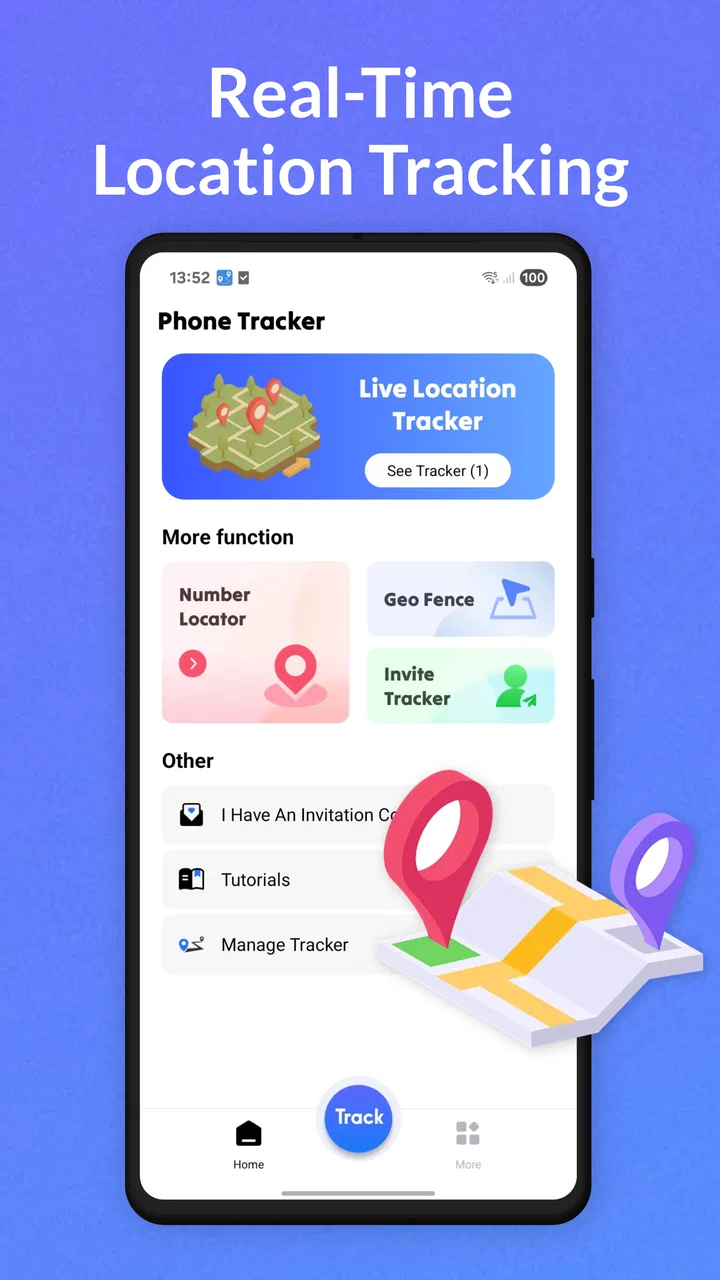
PureLink: Phone & Location Track is designed to help users share and view real-time location information, depending on the permissions and features enabled in the app. It may be useful for coordinating with family members, friends, or trusted contacts. Before downloading, review exactly which tracking, communication, and safety tools are included in the current version, since available features can vary by device, region, subscription, and app updates.
02Does PureLink require permission to access my location?
Yes, location-based applications generally need access to your device’s location to provide tracking or location-sharing functions. PureLink may request permission while the app is in use or, for continuous tracking, permission to operate in the background. You should read each permission prompt carefully and choose the least access necessary. You can change these settings later through your Android or iOS privacy controls.
03Can someone track my phone without my knowledge using PureLink?
A location-sharing app should not be used to monitor another person secretly or without their consent. PureLink’s tracking features are intended for authorized, transparent sharing between users, and most location services require invitations, account access, or permission from the person being located. Keep your account secure, avoid sharing login details, review connected contacts regularly, and disable location sharing whenever it is no longer necessary.
04Does PureLink: Phone & Location Track work on both Android and iPhone?
Compatibility depends on the version of PureLink available for each platform and on the operating system requirements listed in the official store. Before installing, check whether your Android phone or iPhone is supported, as some functions may work differently between platforms. Battery optimization, background activity restrictions, GPS quality, mobile data, and network coverage can also affect how accurately and consistently location updates are delivered.
05Is PureLink free, and are there privacy or subscription concerns?
The app may be available to download without an upfront charge, but certain tracking, communication, or premium options could require in-app purchases or a recurring subscription. Check the Google Play or App Store listing for current pricing, trial terms, renewal conditions, and cancellation instructions. You should also read the privacy policy to understand what personal, device, and location data may be collected and how it is used.
Pros
- Real-time location sharing helps coordinate family members and friends.
- Geofencing alerts can notify you when someone enters or leaves a chosen area.
- Location history makes it easier to review recent movements and visits.
- Simple interface allows quick access to contacts and map features.
- Useful for travel groups
- child safety
- and everyday check-ins.
Cons
- Continuous GPS use may reduce battery life noticeably.
- Accurate tracking depends on a stable internet and location signal.
- Some features may require a paid subscription or in-app purchase.
- Location sharing raises privacy concerns if permissions are mismanaged.
- Background tracking may be limited by Android or iOS power settings.

PureLink:Phone&Location Track
Gallery